Inspect dataset files.Understand data quality.Right on your computer.
Splitline is a local datafile viewer and analyzer for Mac, built for easy dataset-file inspection directly on your computer. Understand structure, schema, coverage, drift, and parse issues without uploading the source. JSON documents stay view-only; complete row datasets can be repaired. Optional AI is request-only, and validated plans execute locally.
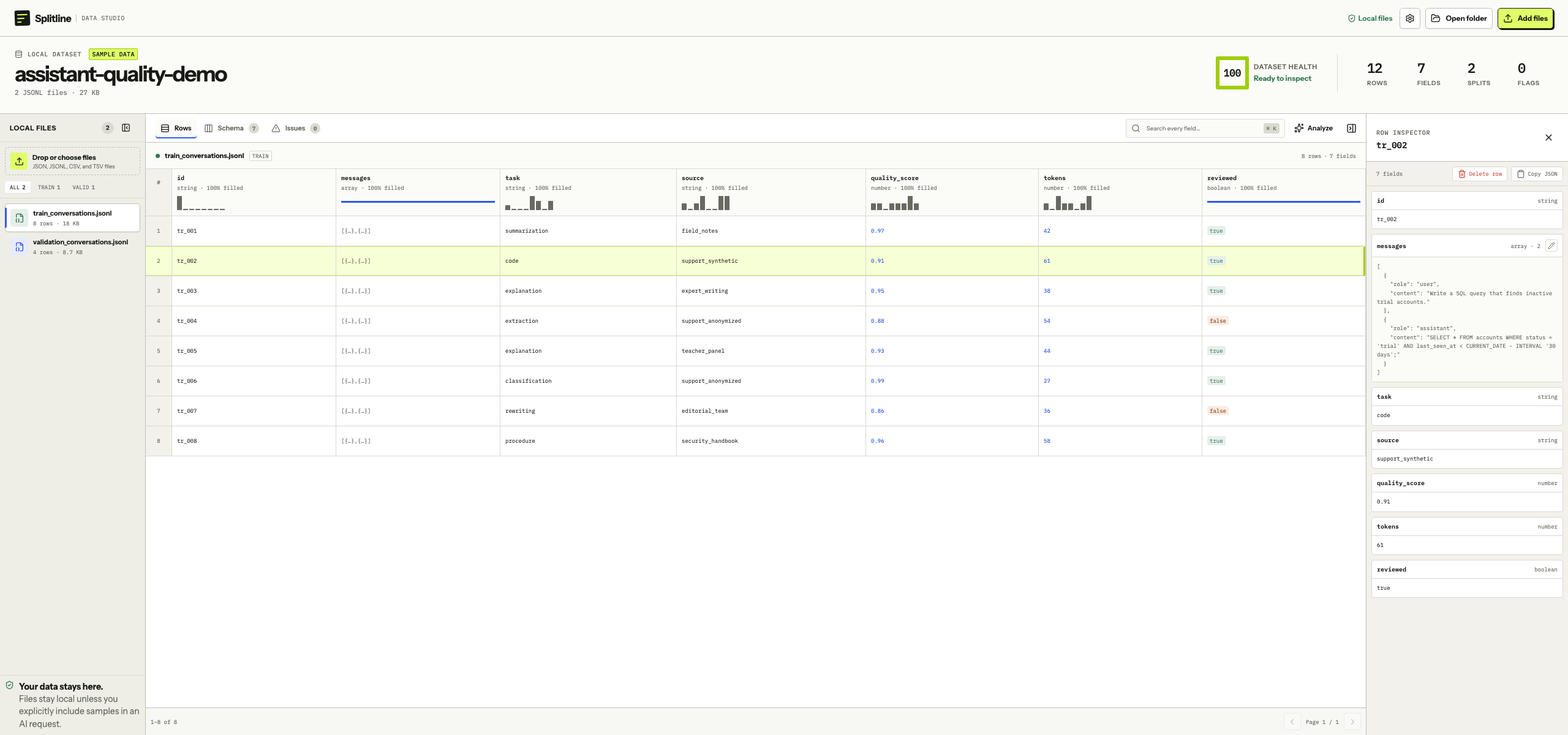
id string · 100% filledtask string · 100% filledquality_score number · 100% filled
tr_001summarization0.97
tr_002code0.91
tr_003explanation0.94
tr_004extraction1.00
01 Profile every field
02 Inspect the evidence
JSONdocumentsJSONLrow dataCSVrow dataTSVrow dataJSONdocumentsJSONLrow dataCSVrow dataTSVrow data
01 / Two jobs, one tool
Opening a file should reveal more than syntax.
Splitline opens the data in its natural shape, then shows structure, field coverage, parse issues, mixed types, and cross-file drift. Every warning keeps the row, file, or field evidence close enough to verify.
“A quality warning is useful only when you can reach the evidence behind it.”
02 / How it works
From file to confidence, without the detour.
Open one file or a whole folder. Splitline selects the right workspace, shows whether a row dataset needs attention, and keeps every normal inspection step offline.
01
Open the file directly.
Double-click in Finder, drop a folder, or choose JSON, JSONL, CSV, and TSV directly.
Nothing to import. Nothing to upload.
02
Inspect data quality.
Profile types, coverage, cardinality, ranges, common values, parse issues, and split-to-split drift.
Every warning keeps its evidence visible.
03
Repair the rows that need it.
Edit primitive and nested values, delete a bad row, undo, and save without reformatting untouched lines.
Your source stays recognizable.
03 / The workspace
Open quickly. Inspect deeply.
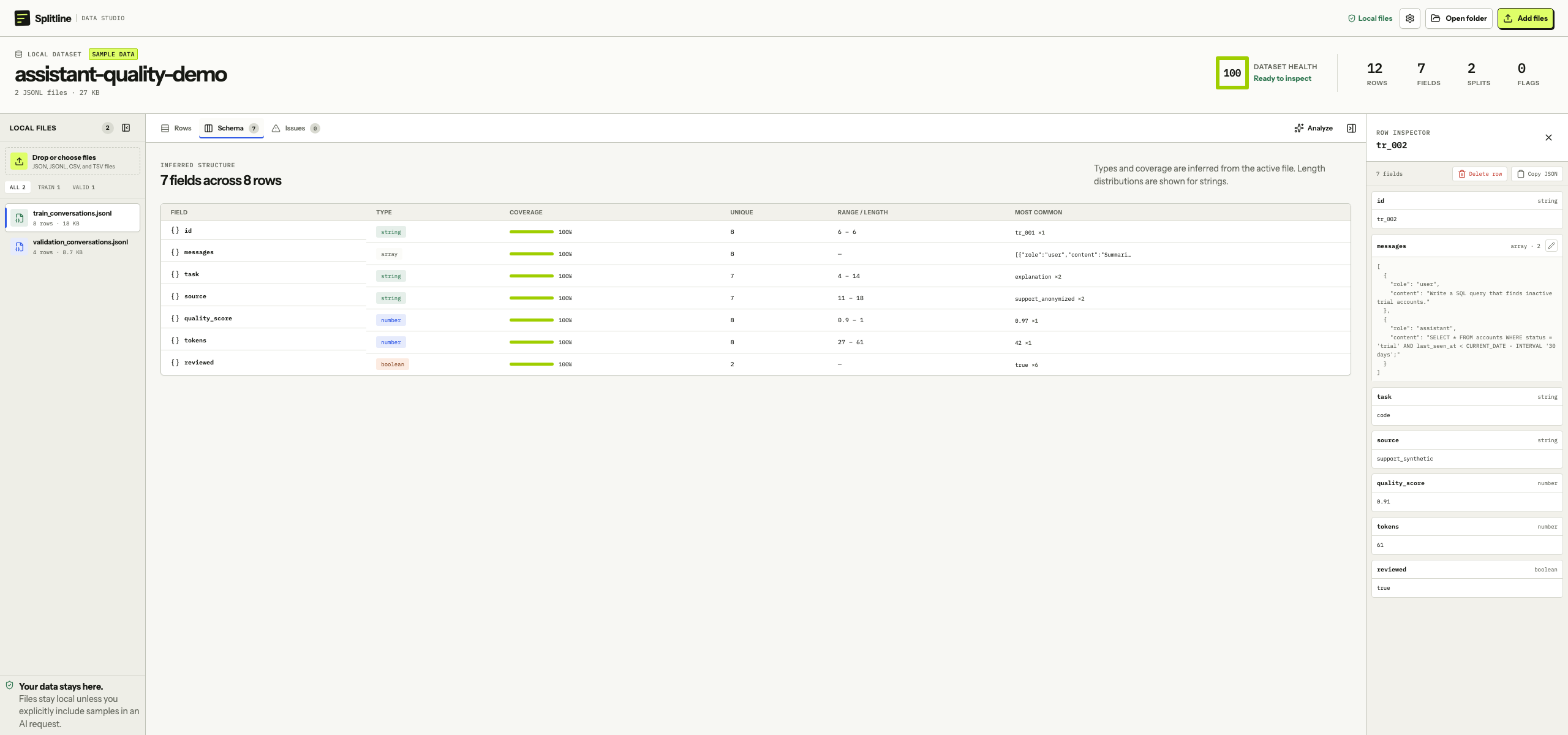
Splitline opens each supported format without an import step. In row datasets, the table, field profile, issues, and selected record stay together, so a quality finding never loses its source context.
Splitline · assistant-quality-demo
RowsSearch nested values, scan content-sized columns, edit cells, and keep the full record open beside the table.Inspect 1:1 ↗SchemaSee inferred types, field coverage, uniqueness, ranges, and common values before quality problems reach downstream work.Inspect 1:1 ↗
04 / Data quality + analysis
Check the quality. Then ask deeper questions.
Health Check inspects loaded row files automatically and points each deduction back to evidence. Analyze is optional and stays idle until you open the chat and send a request; the outbound and local parts remain visibly separate.
Health check On-device · automatic
A quality score. Evidence for every deduction.
Splitline checks parsing integrity, cross-split schema drift, mixed field types, and empty files. Every deduction stays paired with issue details and the file or field evidence behind it.
Runs as soon as files parse
Explains every deduction
Keeps source evidence visible
Example health check3 files · 12 rows
82Dataset health
2 checks need review. The rest of the dataset is ready to inspect.
Parsing integrityReview1 malformed record
Split consistencyReview1 field changed type
File readinessPass0 empty files
AI chat analysis By request only · user initiated
Your question starts the path.
Nothing analyzes your rows in the background. Open Analyze, review the composer’s send boundary, and submit a question. The model may answer in prose or propose a narrow plan—never code to execute.
01 Open Analyze
02 Review boundary
03 Ask in chat
04 Validate reply
05 Run locally
06 Inspect result
Only a validated analysis plan reaches Splitline’s local execution engine. By default, row values remain excluded; bounded samples are a separate, explicit choice.
Repair the record without rewriting everything around it.
Patch-based edits change only the rows you touched. Untouched source lines stay byte-identical, so a small fix does not turn into an unreadable whole-file diff.
Normal file inspection makes no network request. Parsing, profiling, search, edits, and local analysis happen on your Mac. The packaged app may check GitHub for a newer signed release, sending no app-specific data beyond its version; downloads remain user initiated.